

Sensor Indicator
con Delamaire Nicolas

Sensor Indicator
Attualmente dispositivi supportati:Samsung Galaxy S4Samsung Galaxy Note 3
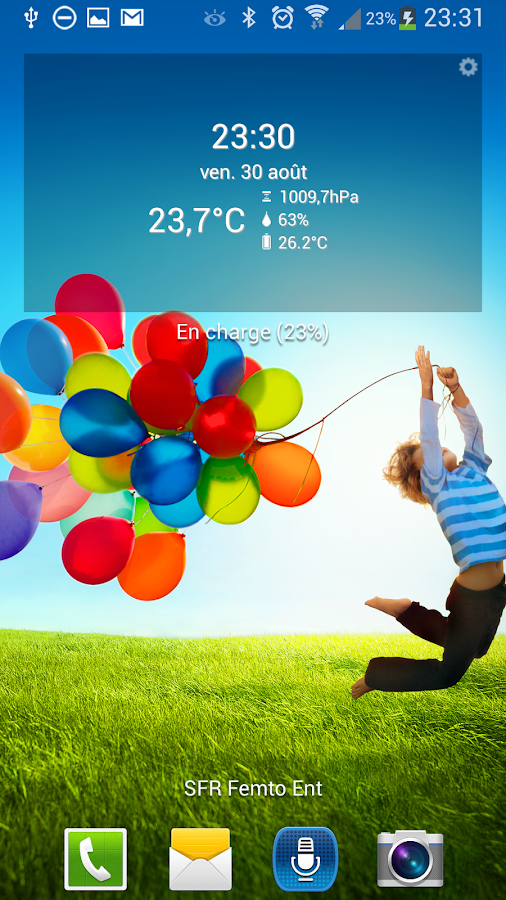
Con questo widget, è possibile visualizzare:
* La temperatura esterna tramite il termometro integrato nel vostro smartphone* La temperatura della batteria* L'umidità* La pressione atmosferica
Non è necessaria alcuna connessione internet.
Se non si dispone di un sensore sul tuo telefonino, non è possibile selezionare le informazioni visualizzate sul widget.
Toccare il widget una volta forzare per aggiornare i valori in tempo reale durante un periodo di 10 secondi per impostazione predefinita.
Testato su Galaxy S4.
About Sensor Indicator
- Package name (App ID)
- fr.tito.sensorindicator
- Available on
- Google Play
- Price
- Free
- Version
- v1.7
- Updated
- September 21, 2014
- Developer
- Delamaire Nicolas
Looking for the Sensor Indicator APK?
The safest way to get Sensor Indicator (fr.tito.sensorindicator) on your Android device is to install it directly from Google Play — you'll always get the latest official version, automatic updates, and no risk of modified or infected APK files from third-party sites.

Weather Features
Get accurate weather forecasts and real-time updates.
Smart Home
Control and monitor your home with smart features.
Automotive
Manage and monitor your vehicle with smart features.
Guarda Sensor Indicator in azione

Cosa dicono i nostri utenti
Non fidarti solo della nostra parola. Ecco cosa dicono i nostri utenti di questa app Android.
"Does not show temperature at all! It's trash. Uninstalling it."
"Can't open"
"Good"
"Ok"
"Does not work, don't bother."
"Its good"
"Great app. Works with my Galaxy Note 3. Thank you! :)"
"very good"
"looks great but unable to change to fahrenheit and the gear in the upper corner makes it not look as sharp. wouldn't mind buying professional version. kinda annoying that its not visible in apps and have to uninstall it via google store."
"Good"
Frequently Asked Questions
Is Sensor Indicator free?
Yes, Sensor Indicator is free to download and install on Android through Google Play.
How do I install Sensor Indicator on Android?
Open Google Play on your Android phone or tablet, search for Sensor Indicator by Delamaire Nicolas or tap the Google Play button on this page, then tap Install. The app downloads and installs automatically.
What is fr.tito.sensorindicator?
fr.tito.sensorindicator is the App ID (package name) of Sensor Indicator on Google Play. Every Android app has a unique package name, and it is the safest way to verify you are installing the official app.
Is Sensor Indicator safe to download?
Installing Sensor Indicator from Google Play is the safest option: you get the official version published by Delamaire Nicolas, verified by Google Play Protect, with automatic updates. Avoid APK files from unofficial third-party sites.
Get Sensor Indicator Today
Sensor Indicator for Android — free download on Google Play.
Compatible with Android phones and tablets — available on Google Play.
Chiedi all'IA su questa app
Ottieni risposte istantanee su funzionalita, suggerimenti e altro.