

Sensor Indicator
durch Delamaire Nicolas

Sensor Indicator
Geräte derzeit unterstützt:Samsung Galaxy S4Samsung Galaxy Note 3
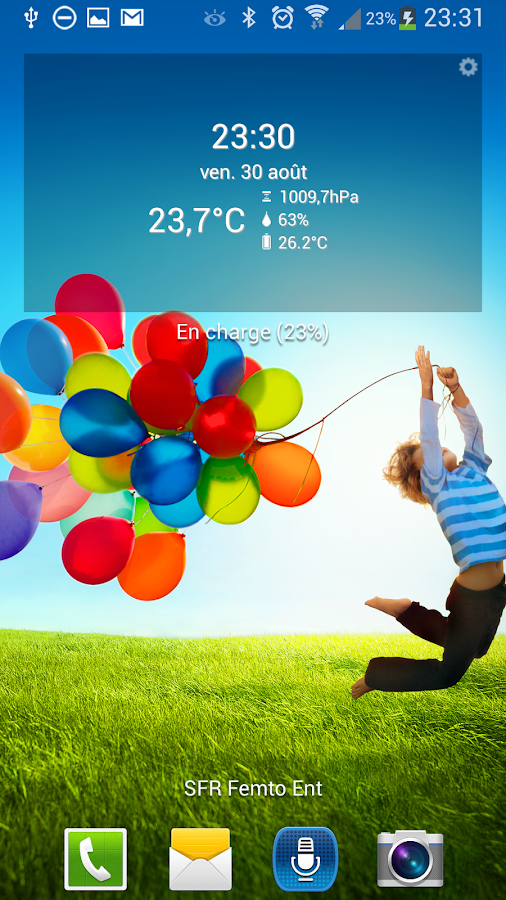
Mit diesem Widget können Sie:
* Die Außentemperatur über dem Thermometer in Ihr Smartphone gebaut* Die Temperatur der Batterie* Die Feuchtigkeit* Der Luftdruck
Kein Internetzugang ist erforderlich und niedrigen Energieverbrauch.
Wenn Sie nicht über einen Sensor auf Ihrem Handy, können Sie nicht wählen Sie Informationen über das Widget angezeigt.
Tippen Sie auf das Widget einmal zu zwingen, ihre Werte in Echtzeit während eines Zeitraums von 10 Sekunden eingestellt aktualisieren.
Getestet auf Galaxy S4.
About Sensor Indicator
- Package name (App ID)
- fr.tito.sensorindicator
- Available on
- Google Play
- Price
- Free
- Version
- v1.7
- Updated
- September 21, 2014
- Developer
- Delamaire Nicolas
Looking for the Sensor Indicator APK?
The safest way to get Sensor Indicator (fr.tito.sensorindicator) on your Android device is to install it directly from Google Play — you'll always get the latest official version, automatic updates, and no risk of modified or infected APK files from third-party sites.

Weather Features
Get accurate weather forecasts and real-time updates.
Smart Home
Control and monitor your home with smart features.
Personalization
Customize the app to match your preferences and workflow.
Sensor Indicator in Aktion sehen

Was unsere Nutzer sagen
Verlassen Sie sich nicht nur auf unser Wort. Hier ist, was unsere Nutzer ueber diese Android-App sagen.
"Does not show temperature at all! It's trash. Uninstalling it."
"Can't open"
"Good"
"Ok"
"Does not work, don't bother."
"Its good"
"Great app. Works with my Galaxy Note 3. Thank you! :)"
"very good"
"looks great but unable to change to fahrenheit and the gear in the upper corner makes it not look as sharp. wouldn't mind buying professional version. kinda annoying that its not visible in apps and have to uninstall it via google store."
"Good"
Frequently Asked Questions
Is Sensor Indicator free?
Yes, Sensor Indicator is free to download and install on Android through Google Play.
How do I install Sensor Indicator on Android?
Open Google Play on your Android phone or tablet, search for Sensor Indicator by Delamaire Nicolas or tap the Google Play button on this page, then tap Install. The app downloads and installs automatically.
What is fr.tito.sensorindicator?
fr.tito.sensorindicator is the App ID (package name) of Sensor Indicator on Google Play. Every Android app has a unique package name, and it is the safest way to verify you are installing the official app.
Is Sensor Indicator safe to download?
Installing Sensor Indicator from Google Play is the safest option: you get the official version published by Delamaire Nicolas, verified by Google Play Protect, with automatic updates. Avoid APK files from unofficial third-party sites.
Get Sensor Indicator Today
Sensor Indicator for Android — free download on Google Play.
Compatible with Android phones and tablets — available on Google Play.
Frag die KI zu dieser App
Erhalte sofortige Antworten zu Funktionen, Tipps und mehr.